Headr

Load-bearing software for contractors.

Every opening needs a header to carry the weight above it. Headr carries yours. It's job management software that keeps your jobs, schedule, crews, sales and warehouse in one place, set up for how your trade already works and simple enough that your crew will actually use it.

From $29 a month. Standard is $129 for up to 25 people

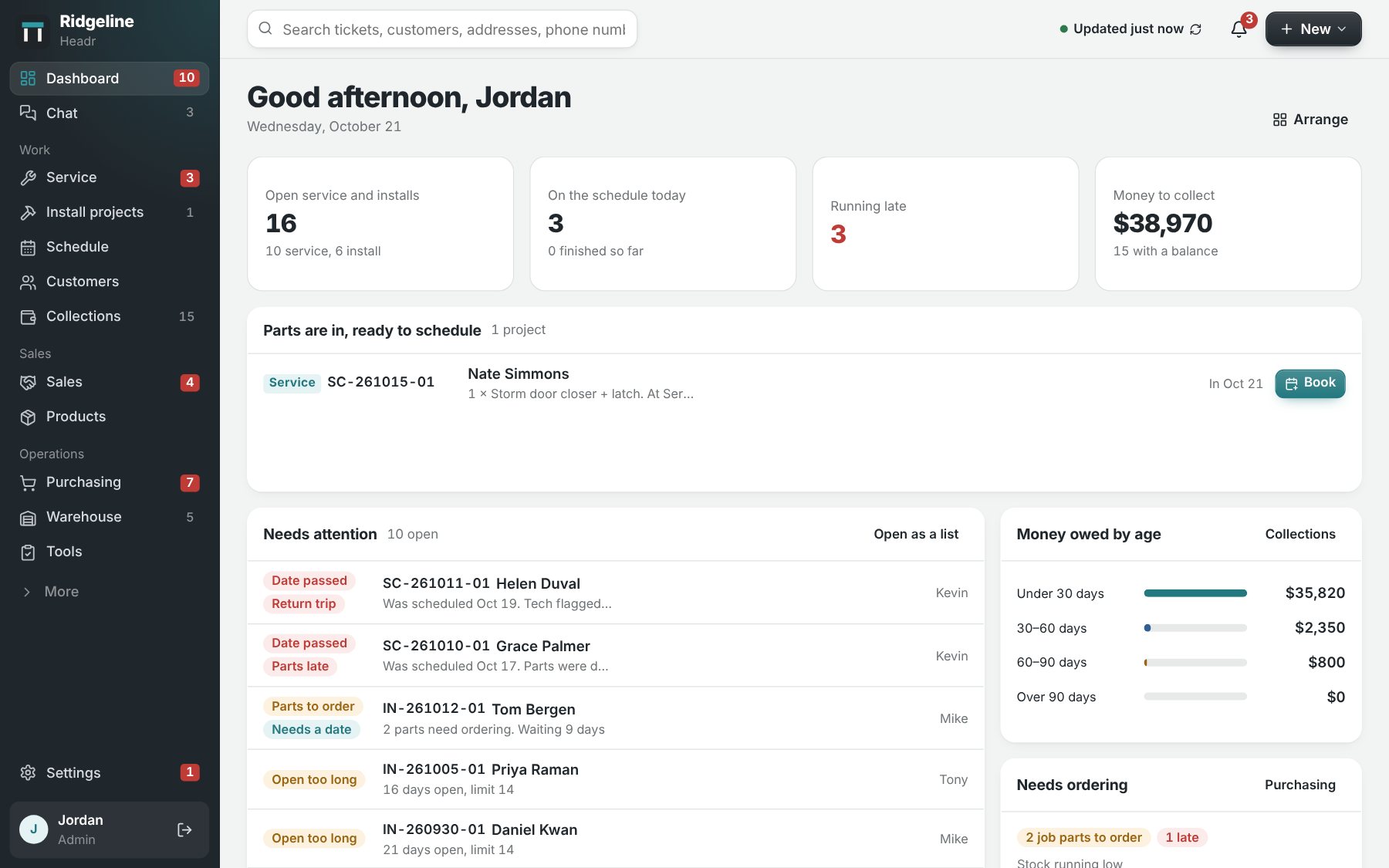
The Headr dashboard: open service and installs, today's schedule, jobs running late, money to collect, parts that are in and ready to schedule, and jobs that need attention.

Pick your trade and the steps are already there.

Every trade runs a job a little differently. Pick your trade from the list below and Headr fills in the steps a job goes through, from the first visit to the last payment. No setup needed to operate! Use them as they are, cut them down to five, or add every permit and inspection you deal with. These steps are 100% Customizable to the way you work!

Windows and doors

The simple version has 6 steps. The full one tracks 15.

    Marked steps have to be finished before the job moves on.

    Installs, service calls and sales visits on one calendar.

    Everybody's on the same schedule, from install crews to service techs to salespeople. Look at a day, a week or the whole month, or show just production. Time off and warehouse days are on there too, so you don't book someone who isn't around.
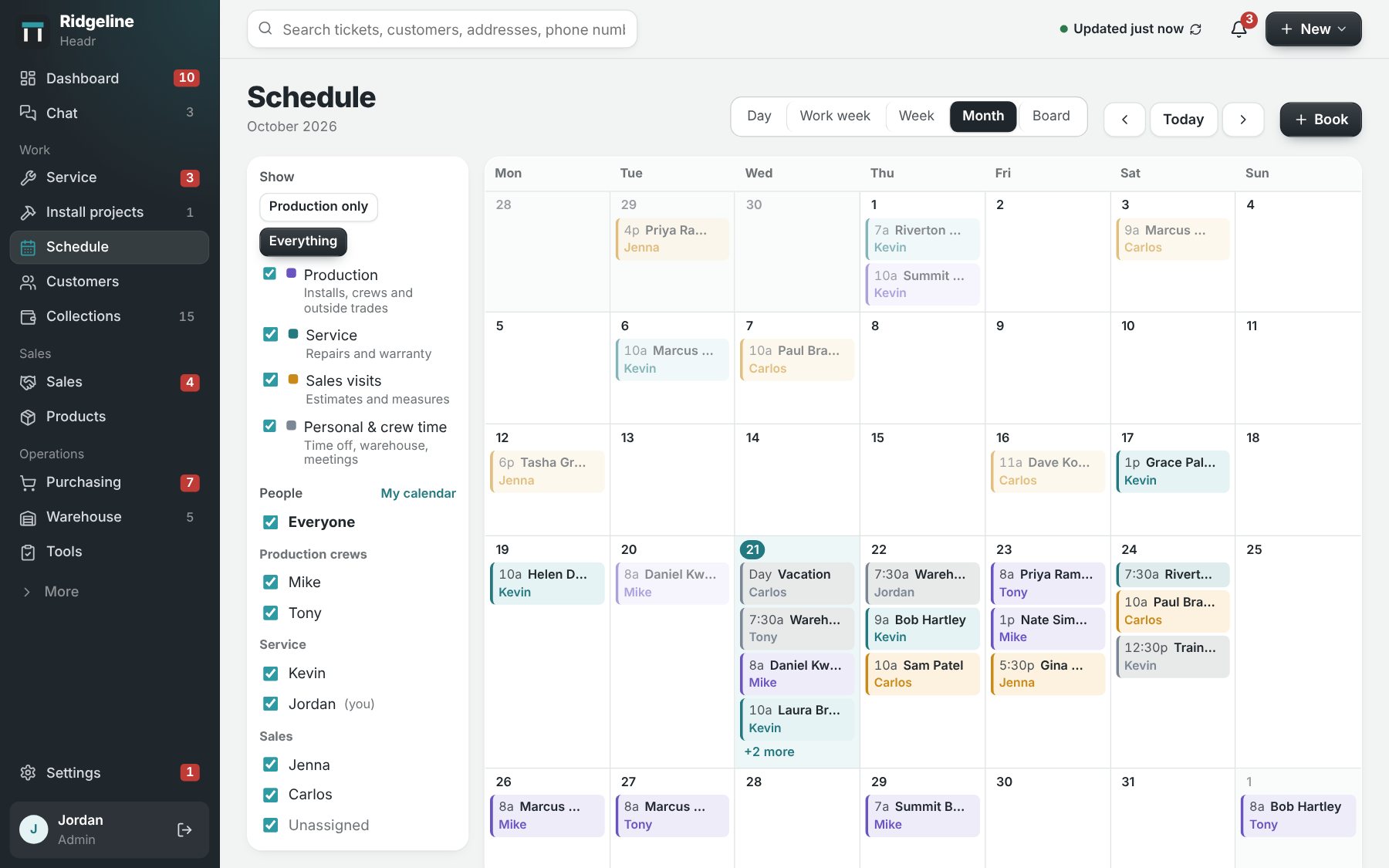
    The Headr schedule in month view, color-coded for production, service, sales visits and crew time, with a list of crews and people to show.

    Follow every lead until it's sold.

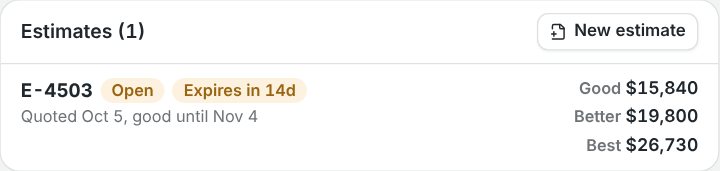
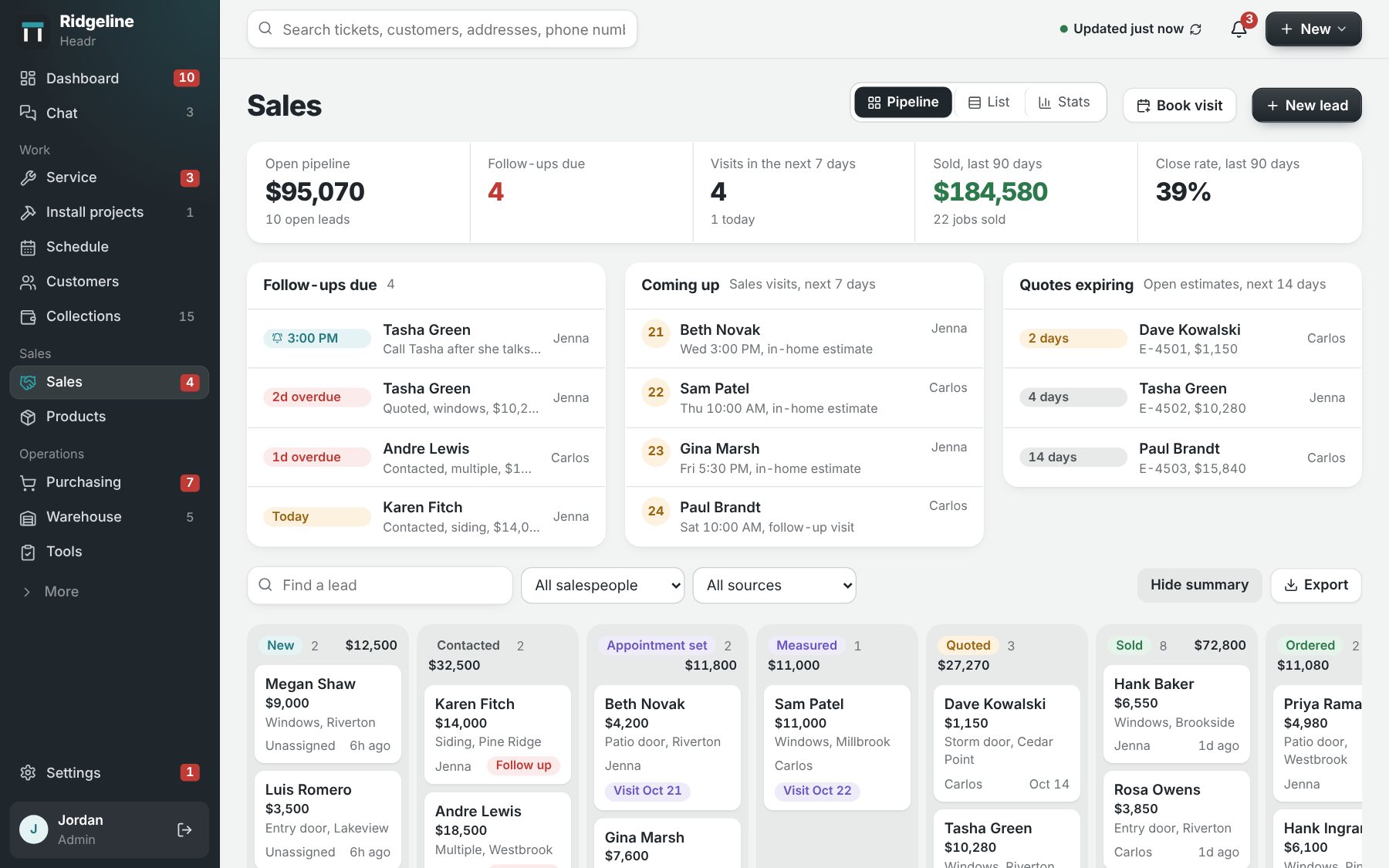
    Each lead has a stage, a salesperson and a date to follow up. Put together estimates with good, better and best options. When it sells, Headr makes the project, the parts list and the customer record, so nobody types it in twice.

    The sales pipeline: open pipeline value, follow-ups due, sales visits coming up, quotes expiring, and leads in columns from New to Ordered. An estimate with three options to choose from: Good $15,840, Better $19,800 and Best $26,730.

    Built for the field, not just the office.

    Easy to learn

    If someone can send a text, they can use Headr. You won't need a training day.

    Everyone sees their own work

    Installers see their schedule and their jobs. Simple mode hides the menus they don't need.

    Works on any device

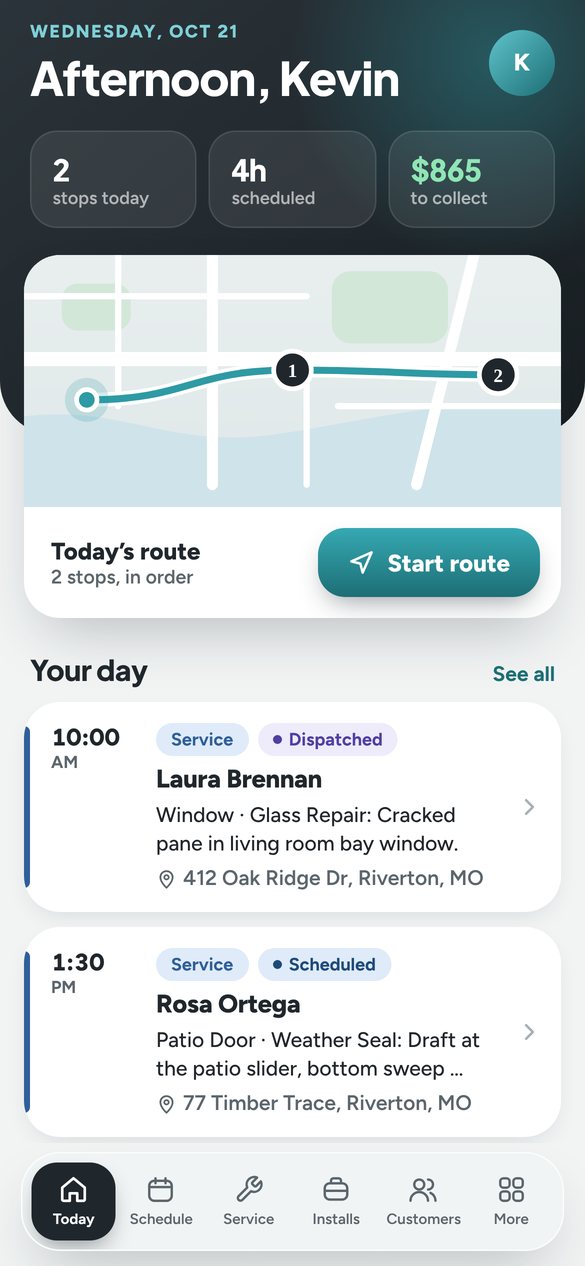
    Use it on the office computer, a tablet, or a phone on the job site.

    The Headr phone app for someone in the field: today's stops on a route map with a Start route button, then the day's service calls with times and addresses.

    Know what's on the shelf before the truck leaves.

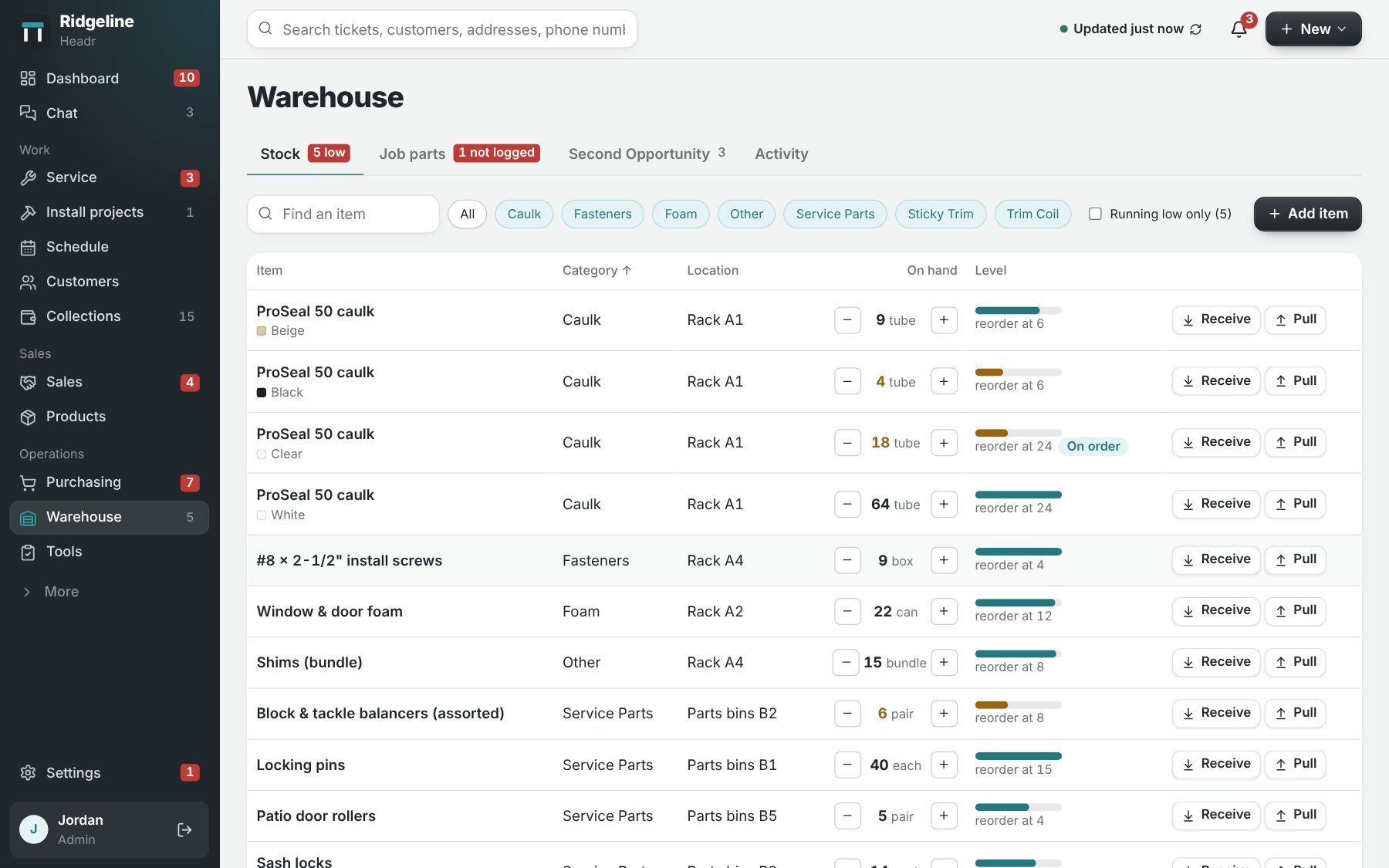
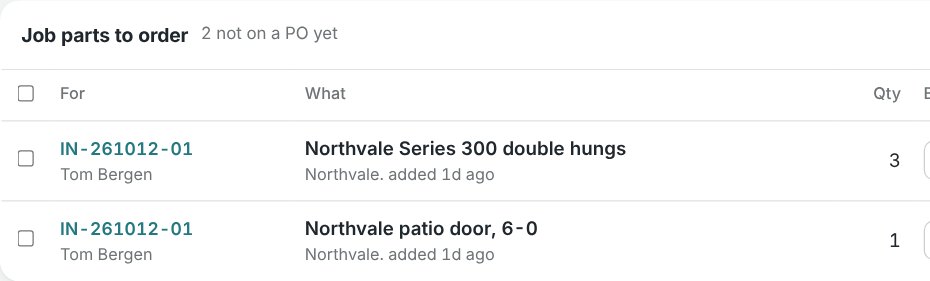
    Keep count of the caulk, foam, coil and service parts on the shelf, plus everything ordered for a specific job. Put what's running low and what each job needs on a purchase order, then check it in when it shows up. When the last part for a job is in, the office gets a heads-up that it's ready to schedule.

    The warehouse page: caulk, fasteners, foam and service parts with how many are on hand, where they're kept, and when to reorder. Job parts to order: double hung windows and a patio door for one install, with the vendor to buy from.

    Set the steps that can't be skipped.

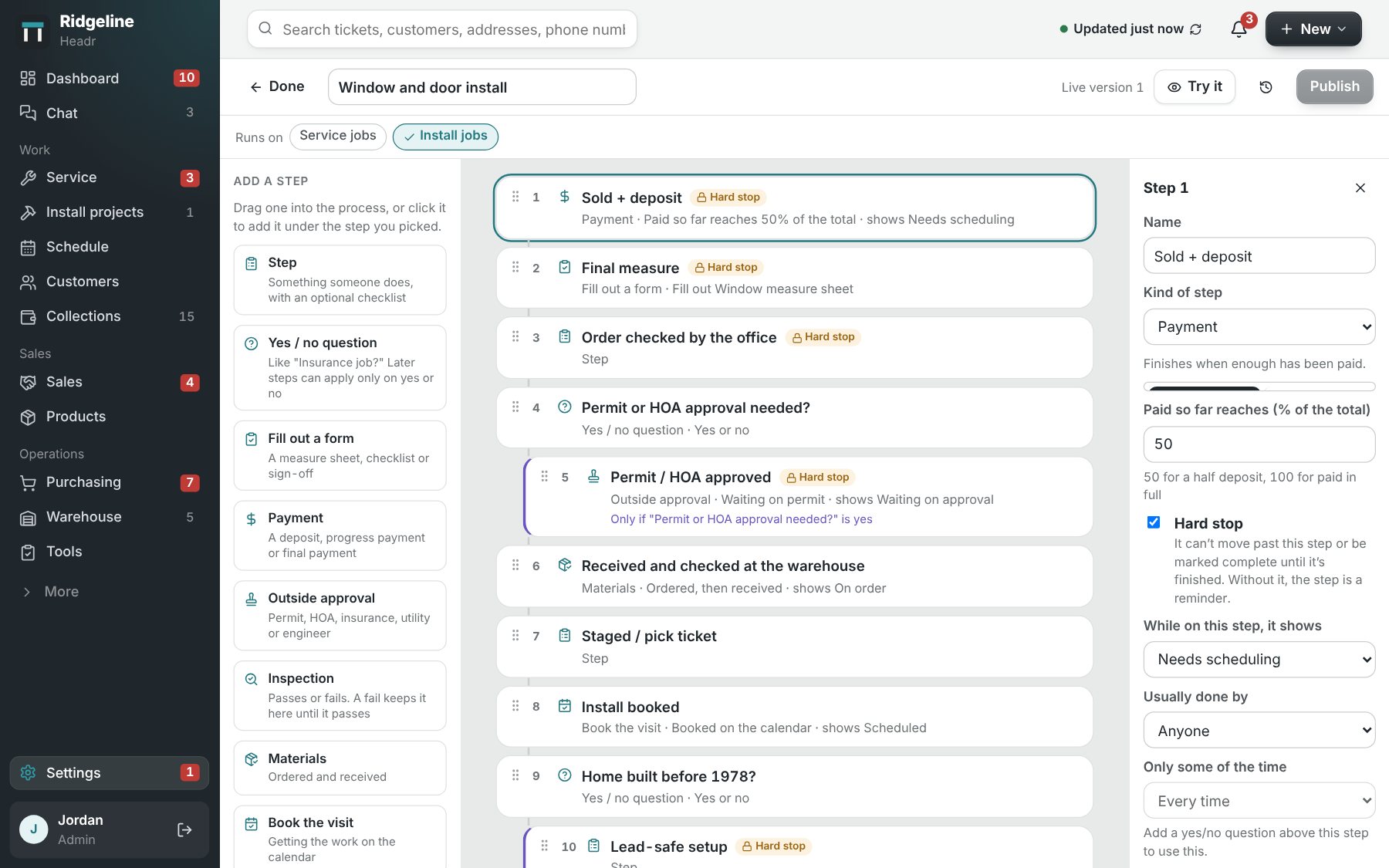
    Some things have to happen before anything else does, like getting the deposit before you order or getting the permit before the install. Mark those steps and Headr won't let the job move forward until they're done.

    • When a payment comes in, a visit gets booked, a form is filled out or the parts arrive, Headr checks the step off for you.
    • If an inspection fails, the job stays put until it passes.
    • Ask yes or no questions like "Is this an insurance job?" and only the steps that job needs show up.
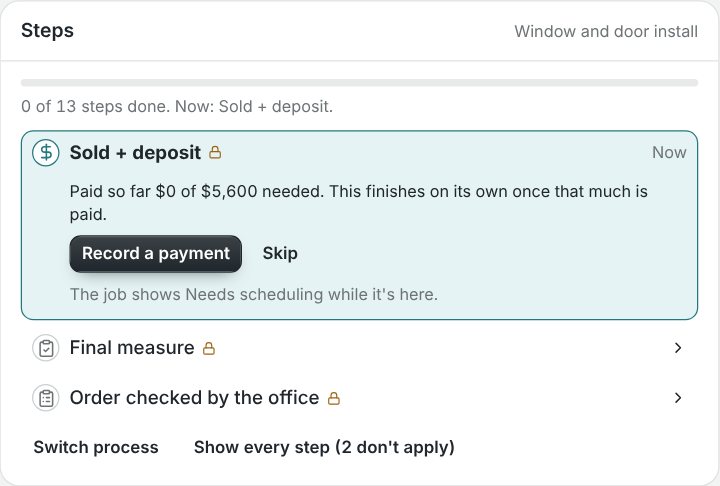
    The process editor for a window and door install: steps like Sold plus deposit, Final measure, Permit or HOA approval and Install booked, with hard stops marked and settings for the selected step. A job's steps: Sold plus deposit is the step it's on now, $0 of $5,600 paid, with a button to record a payment. Final measure and Order checked by the office come next.

    Plus the everyday stuff.

    Forms
    Measure sheets, checklists and sign-offs set up the way you do them, with your logo on the PDF.
    Repeat work
    Maintenance plans and yearly cleanings create their own jobs ahead of time.
    Automations
    Set up simple rules, like "when a job is sold, let the office know."
    Who sees what
    Choose what each role can see, add, change and delete.
    Texts and email to customers
    Send appointment reminders and updates.
    Team chat
    Chat rooms for the crew, the office and each job.
    Your logo and colors
    Headr, and everything your customers see, uses your logo and colors.
    Your data
    Download a full backup to Excel any time.

    Why I built it

    I'm Chase. I run a service team and a warehouse for a window and door company. Most job software I've seen is either a spreadsheet or a big CRM you need somebody to set up for you.

    I wanted something my crew could pick up on their own, and something I could change myself when the way we work changes.

    I've been the guy holding it all together. Now Headr does that part.

    Chase Harget, founder

    Sized for your span.

    A header gets sized to the opening it has to carry. Headr works the same way: pick the plan that fits how many people log in. Crew members you only put on the schedule are free on every plan, and every plan starts with 14 days free.

    Lite

    $29 a month

    Up to 3 people with a login

    • Jobs, schedule and customers
    • Your trade’s ready-made steps and forms
    • Team chat
    • 10 GB for photos and files
    • Phone, tablet and computer
    Try it free

    Most companies pick this

    Standard

    $129 a month

    Up to 25 people with a login

    • Everything in Lite
    • Make your own forms, steps and automations
    • Your logo on every form and document
    • Sales pipeline and estimates
    • Warehouse and purchase orders
    • Texts and email to customers
    • Reports
    • 50 GB for photos and files
    • More AI help each month
    Try it free

    Pro

    $179 a month

    Up to 50 people with a login

    • Everything in Standard
    • 1 TB for photos and files
    • More AI help each month
    • Faster support
    Try it free

    Bigger crew, or need something specific? We build custom plans. Tell us how you work and we'll size one for you.

    Ask about a custom plan

    Common questions

    What counts as a login?

    Anyone who signs in to Headr with their own email. If you only put a crew member on the schedule, they don't need a login and don't count toward your plan.

    Do I have to use the steps for my trade?

    No, they're just a starting point. You can rename steps, drag them around, add your own, or start from scratch. Jobs that are already going keep the steps they started with.

    Do I need to install anything?

    No. Headr runs in the web browser on any computer, tablet or phone. Sign up and you're in.

    Can other companies see my information?

    No. Every company's information is kept separate, and Headr checks that on every record, not just on the screen.

    What if I need help inside my account?

    Your Admin can let Headr support look around, read-only, for a few days. You can see every page we open, and you can turn it off any time.

    Can I get a custom plan?

    Yes. If you need more than 50 logins or something set up just for your company, email us and we'll put a plan together.

    What happens when the free trial ends?

    Nothing gets deleted. If you don't sign up, you can still see everything, but you can't make changes until you do.

    Set the header before busy season.

    Try it free for 14 days