Headr

Remodeling software for jobs with a lot of moving parts.

A remodel has phases, subs inside those phases, inspections between them and payments tied to all of it. Headr lays out the whole job, from walkthrough and selections to punch list and lien waivers, and keeps it from moving forward until the permit, the inspections and the payments are done.

From $29 a month. Standard is $129 for up to 25 people with a login.

How a remodeling job runs in Headr

These are the steps Headr sets up when you pick general contractor / remodeler at sign-up. Steps marked have to be finished before the job moves on. Steps that only apply sometimes show up when you answer a yes or no question.

Want it shorter? The simple version is 6 steps: Walkthrough, Estimate sent, Signed + deposit, Work in progress, Punch list, Final payment. Rename, reorder or add steps any time.

Remodel project

Selections, permits, rough and finish phases, inspections, punch list, closeout.

  1. Site walkthrough
  2. Design and selections
  3. Estimate with sub bids
  4. Contract signed + depositHas to be finished firstPayment
  5. Home built before 1978?Yes or no question
  6. Lead-safe setupHas to be finished firstOnly if “Home built before 1978?” is yes
  7. Preconstruction
  8. Permit approvedHas to be finished firstApproval
  9. Start date bookedBooked visit
  10. Demo
  11. Rough phase
  12. Rough inspections passedHas to be finished firstInspection
  13. Progress paymentHas to be finished firstPayment
  14. Close-up
  15. Finish phase
  16. Final inspection passedHas to be finished firstInspection
  17. Punch list walkthrough with client
  18. Punch list completeHas to be finished first
  19. Final paymentHas to be finished firstPayment
  20. Lien waivers from subs
  21. Warranty follow-up and review request
Warranty / service call: 17 steps

Dispatch, diagnose, options, approval, repair or return visit, invoice, follow-up.

  1. Call in
  2. ScheduledBooked visit
  3. Confirmation sent
  4. On the way
  5. Arrived
  6. Diagnosis
  7. Options presented
  8. Customer approved the repair?Yes or no question
  9. Replacement estimate to salesOnly if “Customer approved the repair?” is no
  10. Parts needed for a return visit?Only if “Customer approved the repair?” is yesYes or no question
  11. Parts inOnly if “Parts needed for a return visit?” is yesParts
  12. Return visit bookedOnly if “Parts needed for a return visit?” is yesBooked visit
  13. Repair doneOnly if “Customer approved the repair?” is yes
  14. Tested and workingOnly if “Customer approved the repair?” is yes
  15. Invoice paidHas to be finished firstPayment
  16. Maintenance plan offered
  17. Review request sent

What remodeling contractors get

Punch list that actually closes

The punch list has to be finished before the final payment step.

Lead-safe on older homes

Ask "Home built before 1978?" and lead-safe setup shows up only where it’s needed.

Subs and lien waivers

Collecting lien waivers from subs is its own step at the end.

Plus everything else in Headr

One calendar for installs, service and sales. A sales pipeline with estimates. Warehouse stock and parts for each job. Your own forms, automations, team chat and texts to customers. It’s all included in Standard and Pro.
See all of Headr

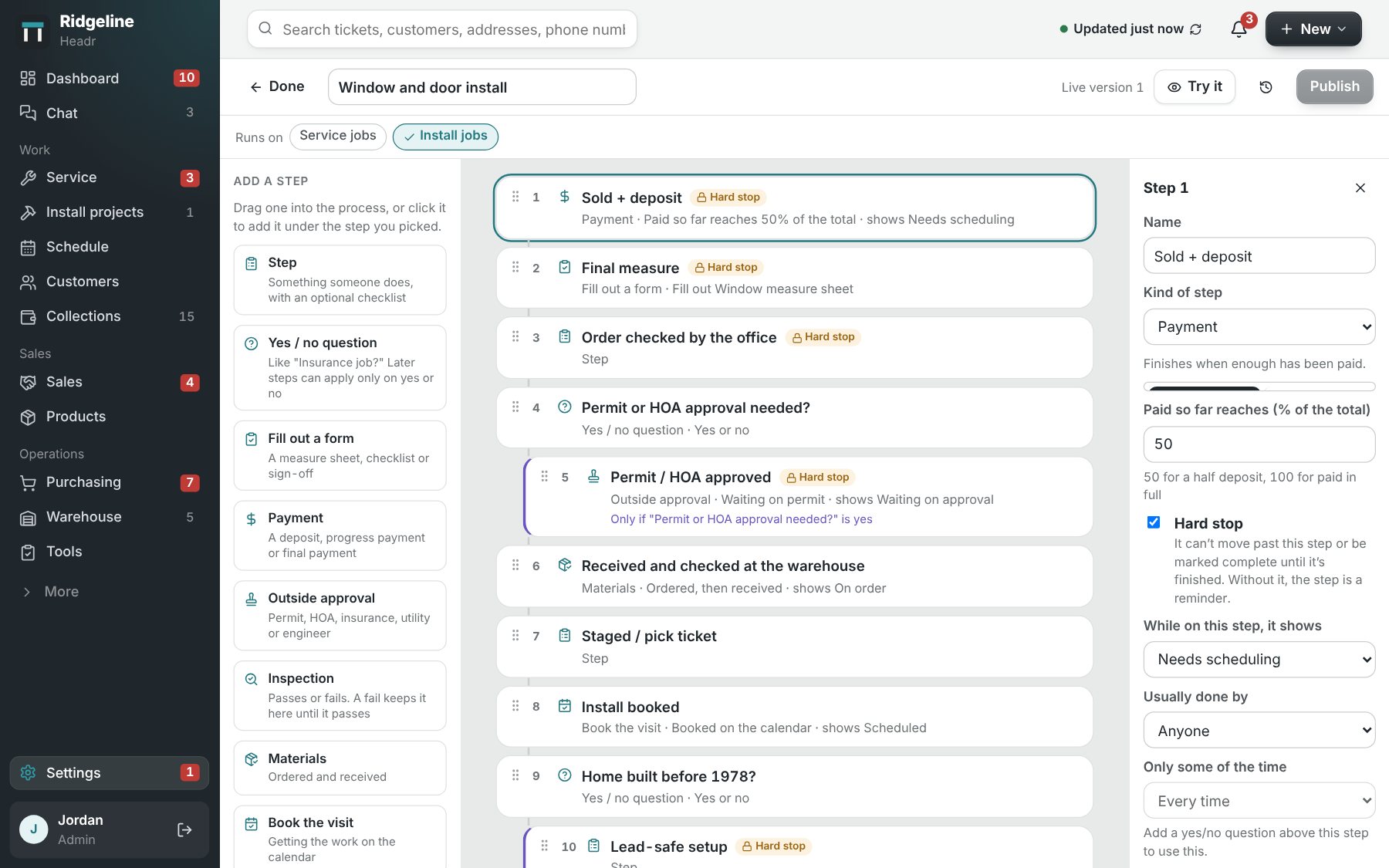
The Headr process editor, where you arrange the steps a job goes through.

Questions from remodeling contractors

Is Headr a replacement for Buildertrend?

For small and mid-size remodelers who want something simpler and cheaper, it can be. Headr doesn’t have a client portal or detailed job costing yet, so check those against how you work.

Can I track change orders?

Yes. Add a change order step wherever you need one, and make it a hard stop if it has to be signed first.

Can my subs use it?

Anyone with a login can. You decide what each role can see and change.

How much does Headr cost?

Lite is $29 a month for up to 3 logins, with your trade’s ready-made steps and forms. Standard is $129 a month for up to 25 logins and includes everything. Pro is $179 a month for up to 50 logins, with 1 TB of storage, more AI help and faster support. Crew members you only put on the schedule are free on every plan.

Is there a free trial?

Yes. Try it free for 14 days with your own jobs and crew.

Try it on your next remodeling job.

Try it free for 14 days